Hodiaŭ al mi, morgaŭ al vi
It’s Monday morning. You’re irritated because eight classes lie ahead of you today. You would do anything not to be there. Just one tram stop and you’ll find yourself in front of “THE institute” that should prepare you for life. With disgust, you try to suppress your Monday morning blues—unbeknownst to you, not all that different from those of an average corporate employee—by daydreaming for just a few more seconds about how amazing the weekend was with your friends.
For crying out loud, if only we didn’t have math on Monday!
you mumble to yourself, simultaneously realising you completely forgot about the assignment due today. The exercises are about conic sections, which you know nothing about. As soon as you arrive at your classroom, you start rummaging through YouTube and Khan Academy videos that are painfully long and don’t cover half of what you need. You also accidentally come across mathematical forums and Discord servers that are half-dead, providing no immediate relief.
Your last hope is the freemium tier of an AI service that promises “less studying and better grades.” After signing up and scrolling through a jungle of incomprehensible text, you give up and decide that’s the best you can do now. You just erase all the “😊” emojis from the response, hope the teacher won’t notice, and hit “Submit”.
 Sometimes, there are just things in life we hate doing, fake them and hope nobody will catch us. Image source: Picryl
Accessibility Features
At its core, web accessibility is about ensuring that everyone, regardless of ability, context, or environment, can effectively access and engage with web content. As you will learn in this article, this rarely stems from simple compliance but about forethought and being intentional about how any user can interact with the content online. Let’s start with the obligatory flame war: dark vs. light mode.
Color Contrast
Users read and comprehend text a quarter faster in light mode.
You might have your own impenetrable arguments about why your favourite color theme is superior and that’s perfectly fine, I do too. However, we shouldn’t forget that not everyone has the same eyes, lighting and display device as you do. When someone is photophobic, a dark theme is a precondition of viewing any web page, not a matter of taste. If you’re developing an app, enforcing one color scheme can quickly become a hindrance to your business, as there will be many newcomers whose eyes don’t see what yours do.
Fortunately, we don’t have to make any guesses. Web Content Accessibility Guidelines, or WCAG, already prescribe the recommended contrast ratios and other useful practices. WCAG does not target specifically visually impaired users but users in general and the guidelines are driven by extensive laboratory testing and the physics of human vision.
Simply put: when web content is clear, legible and concise, you reduce the cognitive load for everyone. For example, 80% of people who use captions in videos don’t have a hearing impairment. In other words, even if the target audience has no disabilities—a bold assumption to begin with—it’s still a very compelling idea to design web accessibly.
Heuri, the EdTech platform I’m developing for high schoolers, offers both a dark and a light theme. However, it currently lacks an automated contrast checker. That is why I want to investigate the tooling provided by Deque, namely the Axe engine. This should act as a pre-flight check for an already robust design system. By using neobrutalism, I get color contrast almost for free, as a rigid layout and highly contrasting colors are core characteristics of this design style.
However, color contrast is important only for people who can see. What if they can’t?
Alternative Navigation
Roughly a quarter of web pages break screen reader navigation by omitting image alternative text.
While blindness is one of the main reasons for using a screen reader, every tenth screen reader user reports disability as not the reason for using it. Users have found a few other use cases of this technology, including people with an attention disorder, text proofreading or situational impairments. That’s why having as many possible ways of interacting with the content is as important as the content itself.
Let’s take a calculator as a textbook example of how things can go wrong when you assume too much even without knowing it.
You take out your phone, find the calculator app and are greeted by the following interface:
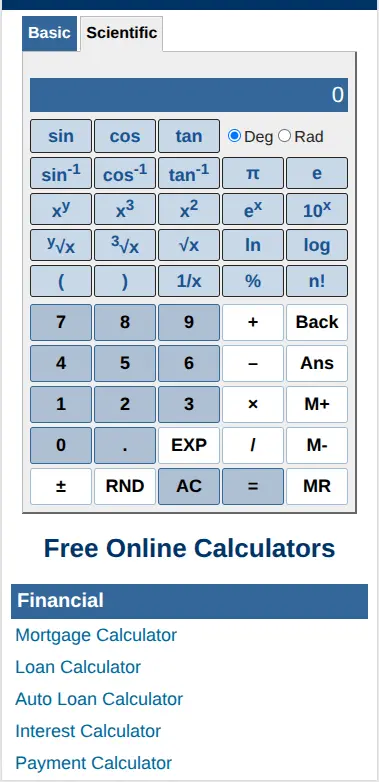 A solid enough tool for a high schooler. Image source: Calculator.net
Traditional Calculator Drawbacks
Calculators like this are all you’ll ever need for high school mathematics. Most of the calculators support both mouse and keyboard input but from my tutoring experience, they still have a few drawbacks.
Assumed Locales
Many calculators assume you operate in an Anglophone environment. Even when regional variants exist, almost none of the tools I have encountered clarify who their intended audience is. You might argue that math is universal and that I am inventing problems where none exist. Yet, despite the universality of mathematics, notation nuances persist across borders. For instance, Czech notation uses a comma as a decimal point. This small difference is crucial: Czech math typically reserves the dot symbol for multiplication.
Outdated Layouts
The interface remains a massive grid of buttons—a layout unchanged for over sixty years. Again, one might argue there is no reason to reinvent a functional wheel. From my tutoring experience, however, I see far too many students struggle to use a scientific calculator. This isn’t due to a lack of intelligence; it’s because school is the only place they will ever encounter one. To many, it feels like using an ancient relic or a remarkably dumb computer. Additionally, tapping miniature on-screen buttons isn’t physically ideal for everyone.
Screen Real Estate
The biggest drawback is fragmentation. If you only have one screen, you are forced to constantly switch interfaces (and alternate between your device, pen, and paper), which drains a nontrivial amount of cognitive energy.
Because of these limitations, I have decided to design a more accessible calculator integrated directly within Heuri. I will keep you updated on how this experiment goes.
Well-structured and Concise Content
Roughly 3 out of 4 of screen reader users scan pages by jumping from heading to heading.
I completely overlooked this aspect during the first months of developing Heuri. The reason is clear: I have no disabilities, at least none that I know of. Once everything looks good on the “digital paper” then it seemed good enough. On the other hand, screen readers and alternative means of navigation rely on a reasonably structured HTML document, as there is only so much a screen reader can guess. Having clear and machine-readable structure is certainly doable, you just have to go the extra mile.
Well-structured web pages should also serve content in dosages digestible for an average user. Heuri embraces this design style by keeping everything strongly hierarchical and bite-sized. You learn one thing and one thing only and then decide whether you want to learn more. You also don’t need a mysterious “Skip to main content” button: any bite screen already is the main content.
This microlearning approach also has a positive effect on an overall page structure. By designing a set of task-specific but reusable components, Heuri achieves predictable and homogenous structure throughout the whole platform. That being said, we shouldn’t pollute the UI with generic “Submit”, “Click me” or “OK” button labels. Poor UX writing is one of the ways of disrupting the document structure.
Predictable structure isn’t a guarantee of predictable user experience, however. Keeping it stupid simple is one of the key design principles that’s likely to hold true, no matter what technology exists in a year, a decade or even a century. That’s why Heuri refuses to spam its users aggressive chatbots, useless notifications and intrusive “We need your cookies, nom nom” alert boxes all over the place. Remember how annoying all those popups are? Now imagine a person with disabilities has to deal with them.
Many EdTech platforms substitute simplicity with effortless comfort, a pitfall I’ve explored in previous articles.
 Learning should be challenging; that shouldn’t surprise anyone. We just need to be very intentional about what makes the learning experience challenging: is it an annoying layout or letting students deal with problems they’ll enjoy solving? Image source: Picryl

Covering the Whole User Flow
Only 1 person out of 40 is capable of handling rapid context switching without severe cognitive degradation.
One of the golden rules of UX writing is that you should know your user. Even though such advice sounds almost banal, sticking to it in practice proves to be a substantially harder task. We still don’t have a clue on the effects online technologies have on adolescents and young adults. One thing we do know quite well is that switching context drains your cognitive battery.
It is fair to assume, then, that accessible web services should minimise context switching as that decreases the overall cognitive load on the student. This “service universality” is very often mistaken for delivering product in the broadest possible scope and implementing as many features as the software and software engineers allow. (I’ve lost count of how many times I’ve heard the buzzword “umbrella solution” in my previous jobs.) Heuri doesn’t need to cover maths, physics, chemistry, economics and be your psychotherapist, nor will it aim to be. All it’s doing is helping high schoolers with math. Whatever specific help that might involve should be a part of Heuri.
Addendum: Dopamine Safety
As I was doing research for this article, I also encountered “point dispensers” quite a few times, most of which were unfortunately educational institutions, including universities.
It’s tempting to gamify the process of learning to make it more attractive. As the classical adage goes: schola ludus (school is play). When an educational institution endorses hunting for credits, XPs or any other valueless currency, it only brings it closer to resembling a casino than a trustworthy organisation.
By introducing point hunting, we’re just hijacking young people’s dopamine and cortisol circuits. This is one of the reasons I’m categorically opposed to apps similar to Duolingo as they design their products the least considerate way on the expense of improved user retention. Do we really need to induce further anxiety and stress in students by manipulating them into using the app with daily challenges or streaks?
If there is one takeaway from this exploration, it is this: students deserve better design, no matter their learning constraints.
Happy and healthy learning!